Showing posts with label Internet Acces. Show all posts

Tuesday, 5 April 2011

Hardware and Function for Internet Access

Hardware (Hardware) needed to access the Internet and its functions, among others are:
1. Computer
2. Modem
3. Line (Line Telephone), Cable TV, ISDN, Mobile

1. COMPUTER
Computers are a major component to be able to access the internet. Computer specifications used in the Internet connection is fast or slow performance to determine Internet access. the higher the specification of a computer, the faster the performance of Internet access, and vice versa.
Minimum specifications of a computer in internet access among others as follows:


Processor
is the brain of the computer to run applications in the computer. Minimum Pentium III 500MHz processor.


RAM (Random Access Memory) serves as a temporary storage medium. Minimum 64MB RAM


Harddisk

used for data storage media secarmagnetik. At least 10GB hard drive
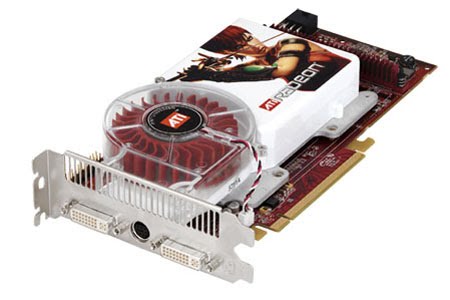


VGA card
Is the hardware for menampilakan image on the monitor screen. VGA card at least 4MB.


Monitor
Is an output device.


2. MODEM
M
Odem acronym derived from modulator demodulator. Modulator is the part that converts the signal information into the carrier signal (Carrier) and is ready to be sent, while the demodulator is the part that separates the information signal (which contain data or messages) of the signal (carrier) that accepted so that information can be received well. Modem is a merger of both, it means the modem is a two-way communication tool.
In short, the modem is a device to convert the computer digital signals into analog signals and vice versa. Computers that connect to the internet connected to telephone lines via modems. Based on the modem functions are divided menjai three types. Among others:
• Dial Up Modem (Internal / External / Cable Modem / ADSL Modem)
Modem functions to convert the analog waves into digital signals into analog waves of telephone wires so that the computer can be connected to the Internet.
Dial Up Modem commonly used by the Personal Computer (PC) is directly connected via phone lines. Type of dial-up modem there are two kinds:

1) Internet Modem
Internet modem is a modem that is installed in the computer, especially the expansion slots are available in computer mainboard. Average speed internal modem for the download is 56 Kbps.
Advantages of using an internal modem, among other things:
a) More efficient place and a more economical price
b) Does not require an adapter so impressed there is a lot more concise without wires.
While the weakness of the internal modem, as follows:
a) This modem does not require an indicator light so it is difficult to monitor modem status
b) The modem is not using its own voltage source that requires power from the power supply. This resulted in temperature increases the heat in the CPU box.
2) External Modem
External modem is a modem that is located outside the computer CPU. An external modem connected to a computer via com port or USB. Installation of this modem is to connect the modem to the power and connect again to the adapter and then plugged back into power.
Gain an external modem:
a) Portability is well enough to be moved around for use on another computer
b) Equipped with indicator lights making it easy to monitor the status of the modem.

The weakness of the external modem:
a) The price is more expensive than the internal modem
b) Requires a separate place or location to put the modem.
• Cable Modem (Cable Modem)
Cable Modem (Cable Modem), is the hardware that connects your PC with a cable TV connection. This cable TV network can be used for connection to the Internet at speeds higher than dialup modem or ADSL modem, cable modem speed maximum of 27Mbps downstream (to the user's download speed) and 2.5 Mbps upstream (upload speed of the user).
Before you can connect to the Internet, so users are required to register with cable TV service providers and ISPs (Internet Service Provider).
• Modem ADSL (Asymmetric Digital Subscriber Line)

ADSL or Asymmetric Digital Subscriber Line is a form of DSL technology. Characteristic of ADSL is its asymmetric, namely that the data transferred in a different speed from one side to another.
The main idea is to split the ADSL phone line signal into two parts for voice and data. It allows users to melakuakn or receive a phone call and make an Internet connection simultaneously without disturbing each other.
Type of modem

1. Analog modem is a modem that converts analog signals into digital signals
2. ADSL Modem
3. Cable modem is a modem that receives data directly from service providers via cable TV
4. CDMA Modem
5. Modem 3GP
6. GSM Modem
3. Line (Line Telephone), Cable TV, ISDN, Satellite, Mobile
Line (Line Phone)
The telephone line is also an important and hardware needed to connect computers to the Internet. The use of the telephone line is also followed by the use of dial-up modem. Currently, we do not have to register again to the ISP, for example by using Instant Telkomnet package which can directly access the internet.
Cable TV
In addition to phone lines, to make Internet access can also be done by using cable TV. To be able to access the Internet using cable TV network, the modem used is a cable modem. To be able to use a cable modem, the computer must be equipped with ethernet (ethernet card). Access service to cable modem via cable TV networks to ISPs are: CBN, indosat, linknet, Centrin, and MyNet.
ISDN
ISDN (Integrated Services Digital Network) is a telecommunication system in which the services of data, voice, and images integrated into a network, and an analog telephone transmission systems to digital systems.
ISDN users are given the advantage of flexibility and cost savings, because the cost of this integrated system would be much cheaper when using a separate system. ISDN services are provided by the ISP, called NSP (Network Service Provider).
Inside there are two types of ISDN services, namely:
1. Basic Rate Interface (BRI)
2. Primary Rate Interface (PRI)
Satellite
VSAT (Very Small Aperture Terminal) is the signal from the satellite receiving station with antenapenerima shaped disc with a diameter of less than 3 meters.
The main function of the VSAT is to receive and send data to a satellite.
Mobile
The Internet also been developed for wireless applications (without cable) by using a mobile phone. The protocol used is called WAP. Wireless Application Protocol WAP is an abbreviated protocol messaging service or a technique that allows a digital mobile phone or mobile terminals that have a WAP facility, see / read the contents of a site on the internet in a special text format. WAP works with text mode with a speed of 9.6 Kbps. In addition to WAP, also developed technology GPRS (General Packet Radio Service), GPRS promises to speed starting from 56 kbps to 115 kbps, allowing for Internet access, multimedia data transmission to computers, notebooks and handheld computers. Currently, there is 3G (Third Generation) mobile phones based on CDMA (Code Division Multiple Access), which has 3G data transfer speeds up to 230 Kbps.
Read More..

Saturday, 2 April 2011

Dial-up Internet access


Availability

Dial-up connections to the Internet require no infrastructure other than the telephone network. As telephone access is widely available, dial-up remains useful to travellers. Dial-up is often the only choice available for rural or remote areas where broadband installations are not prevalent due to low population and demand. Dial-up access may also be an alternative for users on limited budgets as it is offered free by some ISPs, though broadband is increasingly available at lower prices in many countries due to market competition.
Dial-up requires time to establish a usable telephone connection (up to several seconds, depending on the location) and perform handshaking for protocol synchronization before data transfers can take place. In locales with telephone connection charges, each connection incurs an incremental cost. If calls are time-metered, the duration of the connection incurs costs. Dial-up access is a transient connection, because either the user, ISP or phone company terminates the connection. Internet service providers will often set a limit on connection durations to prevent hogging of access, and will disconnect the user—requiring reconnection and the costs and delays associated with it. Technically-inclined users often find a way to disable the auto-disconnect program such that they can remain connected for days.
A 2008 Pew Internet and American Life Project study states that only 10 percent of American adults still use dial-up Internet access. Reasons for retaining dial-up access span from lack of infrastructure to high broadband prices.[1] This has allowed Dial-up providers such as NetZero to continue spending marketing dollars to obtain customers and commit to having U.S. based customer support.
[edit]Performance


"Dial up modem noises"

Typical noises of dial-up modem while a modem is establishing connection with a local ISP-server in order to get access to the web.
Problems listening to this file? See media help.
Modern dial-up modems typically have a maximum theoretical transfer speed of 56 kbit/s (using the V.90 or V.92 protocol), although in most cases 40–50 kbit/s is the norm. Factors such as phone line noise as well as the quality of the modem itself play a large part in determining connection speeds. Some connections may be as low as 20 kbit/s in extremely "noisy" environments, such as in a hotel room where the phone line is shared with many extensions, or in a rural area, many kilometres from the exchange. Other things such as long loops, loading coils, pair gain, electric fences (usually in rural locations), and digital loop carriers can also cripple connections to 20 kbit/s or lower.
Dial-up connections usually have latency as high as 400 ms or even more, which can make online gaming or video conferencing difficult, if not impossible. First person shooter style games are the most sensitive to latency, making playing them impractical on dial-up. Many modern video games do not even include the option to use dial-up. However, some games such as Everquest, Red Faction, Star Wars: Galaxies, The Sims Online, Warcraft 3, Final Fantasy XI, Guild Wars, Unreal Tournament, Halo: Combat Evolved, Audition, Quake 3: Arena, and Ragnarok Online are capable of running on 56k dial-up.
An increasing amount of Internet content such as streaming media will not work at dial-up speeds.
Analog telephone lines are digitally switched and transported inside a Digital Signal 0 once reaching the telephone company's equipment. Digital Signal 0 is 64 kbit/s, therefore a 56 kbit/s connection is the highest that will ever be possible with analog phone lines.
[edit]Using compression to exceed 56k
The V.42, V.42bis and V.44 standards allow modems to accept uncompressed data at a rate faster than the line rate. These algorithms use data compression to achieve higher throughput.
For instance, a 53.3 kbit/s connection with V.44 can transmit up to 53.3 × 6 = 320 kbit/s if the offered data stream can be compressed that much. However, the compressibility of data tends to vary continuously, for example, due to the transfer of already-compressed files (ZIP files, JPEG images, MP3 audio, MPEG video).[2] A modem might be sending compressed files at approximately 50 kbit/s, uncompressed files at 160 kbit/s, and pure text at 320 kbit/s, or any rate in this range.[3]
[edit]Performance assessment

This section's factual accuracy is disputed. Please help to ensure that disputed facts are reliably sourced. See the relevant discussion on the talk page. (August 2009)
Many modems were manufactured as independent communications devices connected to the computer via an RS-232 cable. Modems are capable of independently managing the connection and monitoring signal quality, and can adjust the data rate as line conditions change.
In analog serial communications modems, once the connection is established, the data communications session consumes all available bandwidth.[citation needed] Often there is no backchannel capacity for the modem to communicate connection status to the end user or local computer.[citation needed] During the connection negotiation phase, modems transmit the connection speed to the attached computer in status reports. If the base data rate changes at a later time, there is no way to indicate this change to the local computer during the data communications session.[citation needed]
Although much more capable serial communications such as USB are now used, and in approximately 1992 the soft modem was developed that uses the internal computer CPU to handle modem communications, there is still no defined industry standard backchannel method available to indicate status information such as the current base rate and actual compression ratio, to the user of the local computer.
[edit]Compression by the ISP
As telephone-based 56 kbit/s modems began losing popularity, some Internet Service Providers such as TurboUSA, Netzero, CdotFree, TOAST.net, and Earthlink started using pre-compression to increase the throughput and maintain their customer base. As an example, Netscape ISP uses a compression program that squeezes images, text, and other objects at a proxy server, just prior to sending them across the phone line. The server-side compression operates much more efficiently than the "on-the-fly" compression of V.44-enabled modems. Typically website text is compacted to 5% thus increasing effective throughput to approximately 1000 kbit/s, and images are lossy-compressed to 15-20% increasing throughput to about 350 kbit/s.
The drawback of this approach is a loss in quality, where the graphics acquire more compression artifacts taking on a blurry appearance; however, the perceived speed is dramatically improved and the user can manually choose to view the uncompressed images at any time. ISPs employing this approach may advertise it as "DSL speeds over regular phone lines" or simply "high speed dial-up".
[edit]Replacement by broadband
Broadband Internet access (cable and DSL) has been replacing dial-up access in many parts of the world. Broadband connections typically offer speeds 700 kbit/s or higher for approximately the same price as dial-up.
However, many areas still remain without high speed Internet despite the eagerness of potential customers. This can be attributed to population, location, or sometimes ISPs' lack of interest due to little chance of profitability and high costs to build the required infrastructure. Some dial-up ISPs have responded to the increased competition by lowering their rates and making dial-up an attractive option for those who merely want email access or basic web browsing.[4][5]
[edit]Recession and its effect on service
News reports in 2009 have noted a resurgence of dial-up access in the U.S. resulting from a recessionary economy, as a more affordable way of accessing the Internet.[6][7][8]
Certainly high-speed DSL and Cable are available without local phone service, but the cost of this "naked" service is noticeably higher. AT&T offers basic DSL ("Direct Express") without a phone line for $19.95/month,[9] potentially negating any savings from canceling the phone service. Cable companies do not financially penalize a subscriber for not having a local phone, however cable Internet services are usually more expensive if the customer does not subscribe to their television services.
Social networking sites such as Facebook and Twitter feature mobile editions with limited graphics and reduced functionality, designed for slow Internet connections on mobile devices. These cut-down websites will also perform well on a PC or netbook with a dial-up connection, making modern social networking possible through traditional dial-up Internet access. The affordability of dial-up Internet (and low-end PCs such as netbooks) makes this one viable option for social networking in a recessionary economy.

Source: Wikipedia
Read More..