Showing posts with label Modem Type. Show all posts
Sunday, 3 April 2011
List of device bandwidths
Note that the values given are maximum values, and actual values may be slower under certain conditions (for example, noisy phone lines).[10]
Connection Bitrate
Modem 110 0.1 kbit/s
Modem 300 (Bell 103 or V.21) 0.3 kbit/s
Modem 1200 (Bell 212A or V.22) 1.2 kbit/s
Modem 2400 (V.22bis) 2.4 kbit/s
Modem 2400 (V.26bis) 2.4 kbit/s
Modem 4800 (V.27ter) 4.8 kbit/s
Modem 9600 (V.32) 9.6 kbit/s
Modem 14.4 (V.32bis) 14.4 kbit/s
Modem 28.8 (V.34) 28.8 kbit/s
Modem 33.6 (V.34) 33.6 kbit/s
Modem 56k (V.90) 56.0/33.6 kbit/s
Modem 56k (V.92) 56.0/48.0 kbit/s
Hardware compression (variable) (V.92/V.44) 56.0-320.0 kbit/s
Server-side web compression (variable) 200.0-1000.0 kbit/s
Read More..
Saturday, 2 April 2011
Modem Dial Up Networking
Dial-Up Networking: a set of protocols and software used to connect a computer to the internet service provider (ISP), online service or a remote computer, through an analog modem and POTS (plain old telephone system).
Dial-up networking is a type of computer connection to the Internet's most widely used. In late 2000, more than a quarter billion subscribers to dial into the Internet - four times more than other popular access methods, such as broadband DSL, cable modems, and ISDN. Here are a few things you need to know:
Dial-up networking using a modem as an interface between a PC with a network like the Internet; modems usually have a speed of up to 56 kbps.
Dialing with a modem is still the cheapest way of internet access and most widely available. But because it has a relatively slow speed, sites rich in graphics take a long time to load.
The maximum speed in downloading data using a dial-up networking is limited to the phone system's analog bandwidth, line quality, and Internet traffic.
Dial-up networking usually communicates with the ISP using the Point to Point Protocol.
While broadband services like DSL, cable modems, and satellite, is widely available throughout the world, dial-up networking continues to grow. It is estimated that wireless connectivity will face the biggest challenge of dial-up networking in terms of subscribers in the future. In fact, analysts predict, at the end of 2001, people who use dial-up networking are two times more than those who use the service boradband to connect to the internet. In 2003 the gap will close, but dial-up networking is still the most popular way, with a ratio of 1:1.5.
Does A "Handshake"
Dial-up networking is the simplest way to connect to the internet: you only need to connect to your telephone line using a modem, if you are already subscribed to an ISP. Most likely, the software tools you need already exist on Windows, some ISPs, like Earthlink, furnish a user interface for easy setup. Whichever method is used, the dial-up customers usually only need to enter a user name and password, in addition to the ISP's phone number, to the dialog box that appears. Software dial-up networking using the information to build a connection with ISP and doing other work. After setup, which customers need to do is build a connection with double-clicking an icon.
When you do the "handshake", the dial-up networking modem first directs you to the ISP's phone number, which is answered by another modem at the other end. For a few seconds the modems send each other control signals to determine how fast each one can connect. Screeching you hear when you first connect the modem is the sound of your modem and the modem ISP "harmonize" the connection and determine the speed used.
If the connection is established, your modem will silence the internal speaker, and dial-up networking to send user name and password to the ISP using a process called CHAP (challenge handshake authentication protocol). At the ISP, a computer checks your user name and password against a database of consumers. If the ISP authenticates your information, the status of dial-up networking window disappears, and you are free to surf, check and send e-mail, download files, and so forth. The process can take anywhere from 30 seconds to 2 minutes.
Little More Slow, But Reliable
Dial-up networking as well break your data into chunks, encode it, and repacking the data before sending.
Dial-up networking using a method called PPP (Point to Point Protocol) to package the data to be sent through phone lines. Just as Ethernet, PPP data packets, often called a frame, consisting of several parts. There are beginning and end (called "wrappers" or wrapper) that bind the package. Just as Ethernet packets, the PPP frame contains a wrapper in the wrapper. Packaging help direct the data in the packet to its destination using different protocols, like TCP / IP, and also determine the type of data compression used on the package.
One important distinction between PPP frames and ethernet packet is the capacity of the repaired damaged PPP packet using a process called frame check sequence. A package is usually lost or damaged en route, when he arrived at his destination, a damaged ethernet packets discarded and demand will return to the computer that sent the packet to send it back - a very time-consuming process if you use a dial-up, which is much slower than broadband.
In contrast, one part of a PPP wrapper contains a chunk of data called the validation value or the value of validation, which is verified at the destination. In some cases, PPP frames are damaged can be restored through the validation, so no need to be sent back.
If this process saves valuable time that would otherwise be used to send back any damaged package, error-recovery features tend to cause the PPP PPP work slower than a simpler protocol, which has no such error correction. But the internet is a dangerous place for packet data, errors or other problems can cause dozens of packets every second. In the long run, PPP is more suitable for the Internet protocol that is more flexible than others, so it has survived and flourished.
Still Survive - To Present
Any ISP using dial-up networking to connect a computer to the Internet. The most easily recognizable is the national information service and a large ISP. Companies like America Online, EarthLink, AT & T WorldNet, and MSN are the names of which are well known in the past 10 years, and offering services to almost all U.S. (and often provides international access as well). Each of these companies offer interface and dial-up networking built-on its own, with various levels of customization and feature complement.
But often there are some obstacles if you use the interface ISPs: some ISPs restrict access to Internet users who are not part of the bid. America Online, for example, claim to have the largest number of subscribers compared to ISPs and other information services. AOL offers its customers a wide selection of clubs, user groups, and a series of files. So many things to do, so many AOL subscribers only know how to use features and services within the limits established by AOL. This causes them to not get away from AOL.
On the other hand, more and more customers are choosing to use this kind of subscription-only to connect to the dorm. You, for example, can directly use AOL as an ISP, but only a few users who do so.
Small ISPs, Great Service
Small local ISPs typically offer more competitive services, the more non-binding interface, and a variety of different services. "Local" does not mean they are limited geographically. Often they also use the network head-end the same, such as GRIC Alliance, which used a large ISP. And this network provides national access number (even international) to the local ISP. Earthlink and MSN, for example, uses the same network, as well as other small ISPs.
There is also a free ISP, which offers basic connection via the user interface. The tendency, free ISP presents a lot of ads on its interface, and little or no technical support at all if there is a problem. Recently, this kind of service started to charge for their services.
Bright Future
Dial-up networking is a mature technology; over the years, the development of existing technology have improved performance, but not accompanied by adequate amounts. Development of dial-up networking significantly recently is the launch of the V.90 standard, which allows the modems that are used in the two previous standards are not compatible, interconnected. As a result, most modems can be connected with a maximum rate of 56 kbps.
(56K-bps modem specifications, in fact, only translated 52K-bps, and the average maximum of 40K-bps throughput. The quality of copper phone wires and phone jacks are used, the distance the user from the telephone company central office, and internet traffic density and a site, determine the quality of the connection.)
A new standard, called V.92, promising increased upstream rate using pulse code modulation, a more efficient way to retrieve and package the data for transmission. The standard also adds convenience features. With V.92, users who subscribe to the call-waiting service from your telephone company will be able to take a call without losing the connection to the internet. Other V.92 feature, called Quickconnect, given the information "handshake" between your modem with dial-up service, saving connection time is almost half.
With compression technology in sight that promises improved performance using smaller cables and convenience features V.92, seems to dial-up networking will be increasingly on the rise, at least for now. Read More..
Tuesday, 22 March 2011
External and Internal Modem
External Modem
As outlined in addition, an external modem devices are outside the CPU. An external modem connected to the CPU via COM or USB port. Modems of this type typically use a separate voltage source. The advantages of using this type of modem is a fairly good portability so easily removable for use on another computer. Besides, by using an external modem, there should be no expansion slots are sacrificed so that it can be used for other purposes, especially if the mainboard is used only to provide a few expansion slots. External modem is also equipped with an indicator light that allows us to monitor modem status. Disadvantage is more expensive than internal modems. External modems also require a separate place to put it even smaller.
Internal Modem
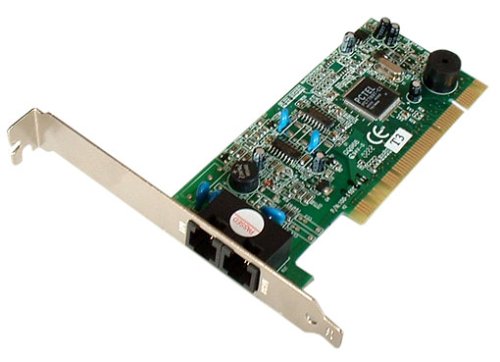
Unlike an external modem, internal modem plugged directly into the CPU. Physically, the internal modem in the form of a card that was stuck on one expansion slot on the mainboard. The use of a modem of this type has several advantages, including more efficient place and the prices are more economical than an external modem. Since it has been installed in the CPU, the modem type does not need an adapter as well as external modems that seem more compact system with no wires much milling about who can give the impression of less neat. However, the internal modem has a weakness as a lack of indicators that can be found on an external modem. As a result somewhat difficult to monitor the status of the modem (though it can be done via software). In addition, the internal modem does not use its own voltage source to be fed from the power supply on the CPU. The heat from the components in a series of internal modems will also increase the temperature within the CPU box.
Advantages of each modem:
* Internal: More easy to install (or a dream of the worst), are usually cheaper because they do not have a separate case and power supply, prevent others from fraudulent acts against our modem because it is located in the computer, do not use wires semerawut, save space , and also saves you money to buy a serial cable and an additional serial card if your PC has a serial port that does not support UART 16 550.
* External: Usually equipped with a panel or LED or LCD displays the info about what is being done by your modem which is useful to help us in this endeavor. Not using a slot inside your computer. Can be switched on or on-off separately from the computer. More easily be moved to place (for example, you can use the same external modem for your laptop or desktop computer.) In areas prone to lightning problem is more secure when using an external modem. On some modems have an LED or LCD may also be interesting and useful. External modem also has voice control that makes it easy for us to adjust the size of the sound quickly and easily. And also an external modem would look cool if ditelakkan on your desk.
Source: Articel Wekekek's Read More..
Modem Type
1. Modem Dial-up (Modem Phone)
Phone modem to work with the wireline telephone network. The speed of the phone modem is varied. For a minimum requirement on residential Internet access, connections with dial-up modem is sufficient. Installation of the modem dial-up this process easier and lower cost. To be able to subscribe to the Internet with dial-up modem can contact your ISP (Internet Service Protocol).
Type of dial-up modem on the market is comprised of an internal modem and external modem. Internal modem is installed on the mainboard expansion slots, while an external modem attached to the computer using a serial data cable or USB data cable.
In Indonesia, some ISPs may serve Internet services with dial-up modem, including Telkomnet, Indosatnet, Wasantaranet, and CBNnet. For now, the dial-up internet access can be done directly with telkomnet @ instant. When you have a phone line from PT. Telkom can do the configuration or settings by providing dial-up modem.
2. Cable Modem
Cable Modem (Cable Modem) is the hardware that connects your PC with a cable TV connection. Cable modems have a way of working that resembles the workings of the Network Interface Card (NIC) or an ethernet card installed on your computer to a Local Area Network (LAN). The difference between the workings of a modem with an ethernet is the distance problem. Modem is not affected by distance, although only has a speed of about 50 Kbps, while on ethernet which has a speed of about 10 or 100 Mbps can only be within a maximum distance of approximately 1 km. Cable modem speeds range from 3-56 Mbps, and can work within a distance of 100 km more. Working process of the cable modem is separate from cable TV signal into two, namely the signal for television and data signals are connected to a cable modem. Both signals will not interfere with each other. Then, the cable modem connected to a network card Network Interface Card contained in the PC. Data rate downstream (incoming signal) averaging around 4-56 Mbps. While the upstream speed (signal exit) ranges from 256 Kbps to 3 Mbps.
Although the content of cable modem is different, basically now its contents as illustrated in the following diagram:
Tuner: the menguhubungkan directly into the CATV channel, typically using a diplexer to allow transmission of entry and exit through the same tuner. Tuner should be good enough quality to receive digital QAM modulated signal.
Demodulator: IF the incoming signal received by demodulator which normally consists of translating Analog to Digital.
Burst modulators: send the signal out through the tuner, Digital to Analog translator.
MAC: Media Access Control, assigned to perform ranging protocol is very similar to the satellite.
Interface: can be Ethernet, PCI bus, USB, or the other.
3. DDSL Modem
Currently, DSL (Digital Subscriber Line) is the main competitor cable modem. In terms of speed and cost does not vary much with the cable modem. Technology for the new DSL modem available is ADSL (Asymmetric Digital Subscriber Line). In Indonesia, not all areas covered by DSL technology. ASDL uses existing telephone cable network in the upgrade or have a particular enhancement. ADSL does not require a second phone line but need a splitter for the division between the modem and telephone. You can call at the same time when connected to the Internet through a single phone line. This is possible because the system on a phone line that can differentiate between high-frequency data transmission and voice transmission at low frequencies. This system still requires its own internet service provider, and in general there is a special collaboration between the telephone network providers and internet service providers. ADSL speed is not too much different from the cable modem, where the maximum downstream speed of 1.5 Mbps, and upstream speeds ranging from 64 Kbps. ADSL technology will develop a modem with a speed of 52 Mbps, about 50 times better than they are now.
4. Voice Modem
Voice modem is a term commonly used to describe an analog telephone data modem with a built-in ability of transmitting and receiving voice recordings through the telephone line. Voice modem is used for phone and answering machine applications. Similar to the Hayes command set of data used for the modem, where the host PC modem commands through a series of commands, known as AT commands, then there is a well-defined set of Common AT commands are somewhat consistent sound throughout the industry.
Source: Articel Wekekek's Read More..